/v1/decisions and /v1/systemone
Decision models answer typed questions about an input and return probabilities instead of text: a yes/no probability, a pick from a fixed list, a score on a scale, or, on models that support it, a box around something in an image. LiteLLM serves them on two routes that share one provider list, so any decision model in your model_list works on either route
| Route | Alias | Request format | Use it when |
|---|---|---|---|
POST /v1/decisions | /decisions | OpenAI Decisions: input plus a list of predicate, choice, score and box questions | You write against OpenAI's format |
POST /v1/systemone | /systemone | System One: state plus a map of noul, choice, score and box questions | You already have TypeSafe Jev request bodies |
The Python SDK calls the same models without the proxy, TypeSafe images and box questions covers TypeSafe's opt-in headers, the Admin UI adds decision models and tests them in a playground, and the benchmarks compare decision models as guardrails, Auto Router classifiers and Lens judges
Extraction models such as Cloudflare Clairic, which fill in typed fields like dates, numbers and lists instead of answering questions, are served on /v1/extraction.
Use decision models with the LiteLLM proxy
- Add decision models to
config.yaml
model_list:
  - model_name: luna
    litellm_params:
      model: openai/gpt-6-luna
      api_key: os.environ/OPENAI_API_KEY
  - model_name: jev
    litellm_params:
      model: typesafe/jev-latest
      api_key: os.environ/TYPESAFE_API_KEY
- Start the proxy
litellm --config config.yaml

# RUNNING on http://0.0.0.0:4000
Availability and supported features
Decision routes are available Since v1.104.2, except the v1.105.0 dev builds, v1.105.0-rc.1 and v1.105.0-rc.2. Some providers and features need a newer release, listed below. A dev build or release candidate can still miss a provider or feature that its release has, such as vLLM, Microsoft Foundry and OpenRouter spend from usage.cost in v1.105.0-rc.3 and the v1.106.0 dev builds
| Provider or feature | Release |
|---|---|
| Gemini Decision 1 | v1.111.0-rc.1 |
vLLM, Microsoft Foundry, OpenRouter spend from usage.cost | v1.104.3 |
| Databricks serving endpoints, image input on Cloudflare Clef, audio and video input on Cloudflare Clef-omni, TypeSafe images and box questions | v1.106.0 |
Databricks ai_decide, Fireworks AI, Laya and Bespoke Nimble, including the Add Model form, and a deployment's own supports_box_questions value in the config and the SDK | v1.107.0-rc.1 |
A deployment's own supports_audio_input and supports_video_input values, and clip requests going only to the group deployments that take clips | v1.110.0 |
| JSON input on OpenAI | v1.112.0-rc.1, and v1.108.14 on the 1.108.x LTS line |
Another LiteLLM proxy as a provider, with litellm_proxy/ models | v1.112.0-rc.1, and v1.108.15 on the 1.108.x LTS line |
| Feature | Supported | Notes |
|---|---|---|
| Cost tracking | Yes | Returned in the x-litellm-response-cost header and written to spend logs. Self-hosted vLLM models have no price, so vLLM calls return no cost header. Databricks OpenJev and ai_decide have a zero price in the cost map, so their calls record $0 even though Databricks still bills your workspace for them |
| Logging | Yes | Works across all integrations |
| Virtual keys, budgets, rate limits | Yes | Normal proxy key auth |
| Load balancing, fallbacks | Yes | Goes through the router like /chat/completions |
| Image input | OpenAI, Gemini, Cloudflare Clef and TypeSafe | TypeSafe needs the TypeSafe-Danger-Zone-Images: true header. Other providers return a 400, or drop the images under drop_params |
| JSON input | OpenAI | azure/ deployments send the parts on as OpenAI does. Other providers, Microsoft Foundry included, return a 400 that names input_json, or drop the parts under drop_params |
| Audio and video input | Gemini Decision 1 and Cloudflare Clef-omni | Other models return a 400, or drop the clips under drop_params, unless a deployment flag turns clips on. openai/ and azure/ deployments refuse clips whatever the flag says |
| Streaming | No |
Supported providers
| Provider | Example model | Credentials | LiteLLM endpoint | Images |
|---|---|---|---|---|
| OpenAI | openai/gpt-6-luna | OPENAI_API_KEY, optional OPENAI_BASE_URL | /v1/decisions | Yes |
| Gemini | gemini/gemini-decision-1 | GEMINI_API_KEY | /v1/systemone | Yes |
| TypeSafe Jev | typesafe/jev-latest | TYPESAFE_API_KEY, optional TYPESAFE_API_BASE | /v1/systemone | With the images header |
| OpenRouter | openrouter/typesafe/jev-1.14 | OPENROUTER_API_KEY, optional OPENROUTER_API_BASE | /v1/systemone | No |
| Fireworks AI (private preview) | fireworks_ai/accounts/fireworks/routers/rune | FIREWORKS_AI_API_KEY or FIREWORKS_API_KEY, optional FIREWORKS_API_BASE | /v1/systemone | No |
| Perplexity | perplexity/pplx-decider-v1-27b | PERPLEXITYAI_API_KEY or PERPLEXITY_API_KEY, optional PERPLEXITY_API_BASE | /v1/systemone | No |
| Cloudflare Clef | cloudflare/clef, cloudflare/clef-flash or cloudflare/clef-omni | CLOUDFLARE_API_KEY and CLOUDFLARE_ACCOUNT_ID, or api_base | /v1/systemone | Yes |
| Databricks | databricks/databricks-openjev-qwen35-4b | DATABRICKS_API_KEY or DATABRICKS_TOKEN, DATABRICKS_API_BASE required | /v1/systemone | No |
Databricks ai_decide | databricks/ai_decide | DATABRICKS_API_KEY or DATABRICKS_TOKEN, DATABRICKS_API_BASE required | /v1/systemone | No |
| Microsoft Foundry | azure_ai/<deployment> with base_model: azure_ai/Microsoft-Decision-1 | AZURE_AI_API_KEY, AZURE_AI_API_BASE required | /v1/systemone | No |
| Strands Decider (self-hosted) | strands_decider/strands-decider-2B-hobson-v19 | STRANDS_DECIDER_API_BASE required, STRANDS_DECIDER_API_KEY optional | /v1/systemone | No |
| vLLM (self-hosted) | hosted_vllm/Qwen/Qwen3-0.6B | HOSTED_VLLM_API_BASE or api_base required, HOSTED_VLLM_API_KEY optional | /v1/systemone | No |
| Laya (self-hosted) | laya/english, laya/multilingual or laya/typed-decisions | api_base or LAYA_API_BASE required, LAYA_API_KEY optional | /v1/systemone | No |
| Bespoke Nimble (self-hosted) | bespoke/nimble on Ollama, else bespoke/nimble-latest or bespoke/bespokelabs/Bespoke-Nimble-9B | api_base or BESPOKE_API_BASE required, BESPOKE_API_KEY optional | /v1/systemone | No |
| LiteLLM proxy | litellm_proxy/<model on that proxy> | LITELLM_PROXY_API_BASE or api_base required, LITELLM_PROXY_API_KEY optional | The route you called | When that proxy's model takes them |
Some of these providers need a newer LiteLLM release than the decision routes, as listed in Availability and supported features
The host matters as well as the model. A decision model works only on a provider that LiteLLM has a Decisions integration for. GPT-6 Luna serves decisions on openai/gpt-6-luna and on Azure OpenAI as azure/gpt-6-luna. AWS Bedrock is not a Decisions provider, so bedrock/ deployments, bedrock/converse/ included, and bedrock_mantle/ deployments of GPT-6 Luna answer chat requests but return Unknown Decisions provider on /v1/decisions, as an Auto Router decision classifier and in the Decision Model guardrail. Amazon's Decisions endpoint on Bedrock does not accept GPT-6 Luna yet. To classify Auto Router requests with a Bedrock-hosted GPT-6 Luna, use the LLM classifier with classifier_type: llm, which calls the model over chat
LiteLLM translates between the two formats, so the route you call does not limit which provider you can use. OpenAI receives OpenAI-format bodies, Gemini receives its native Decisions format and the other providers receive System One bodies. The answers come back in the format of the route you called. Text parts of an OpenAI input are joined into the System One state, and System One questions are named by their keys when they go to OpenAI
Gemini Decision 1 answers yes/no, choice and rubric score questions, with text, images and inline audio/video input. Each request accepts up to 16 images and 20 MiB of decoded image data in total, including remote images downloaded by LiteLLM. Message inputs preserve text and image order. Box questions return 400. PDFs and remote audio/video URLs are not mapped by LiteLLM's Decisions input schema. Per-request api_base or base_url overrides require an explicit api_key in the same request or return 400, even when the deployment has a key. Configure custom deployment URLs with their own key. See the Gemini setup
Cloudflare model names without an @cf/ prefix are expanded to @cf/cloudflare/<model>, and the {"result": ...} envelope Cloudflare returns is unwrapped so the response has the same shape as the other providers. On Databricks the model is the bare serving endpoint name and DATABRICKS_API_BASE points at https://<workspace-host>/serving-endpoints, so the request goes to that endpoint's /invocations route. databricks/ai_decide instead calls the ai_decide AI Function at /api/2.0/ai-functions/ai-decide on the same workspace, which needs the ai_decide preview turned on and reports no token usage. On Microsoft Foundry the model is your deployment name and AZURE_AI_API_BASE is the resource host, https://<resource>.services.ai.azure.com. A project-scoped base such as https://<resource>.services.ai.azure.com/api/projects/<project>/openai/v1 is trimmed back to the host. Azure does not let you name a deployment Microsoft-Decision-1, so deploy it under another name and set base_model so cost tracking finds the price
model_list:
  - model_name: decision-1
    litellm_params:
      model: azure_ai/decision-1
      api_base: https://<resource>.services.ai.azure.com
      api_key: os.environ/AZURE_AI_API_KEY
    model_info:
      base_model: azure_ai/Microsoft-Decision-1
Strands Decider has no default host, so set STRANDS_DECIDER_API_BASE or pass api_base. vLLM needs v0.32.0 or later, which includes vllm-project/vllm#59299, and answers choice, noul and score questions as described in vLLM's Structured Decisions docs. It serves the model architectures listed in its READ_STRATEGIES, Qwen3 and Qwen3.5 among them. To use vLLM as the Auto Router classifier, see vLLM
Self-hosted Laya and Nimble
Laya and Bespoke Nimble are decision models that you host yourself. From a build containing LiteLLM #45260 they are providers for /v1/decisions and /v1/systemone, and you can add them from the Admin UI under Models + Endpoints, Add Model, with Mode set to Decisions - /v1/decisions. Earlier builds serve them only on their own gateway routes
| Model | Gateway route | Server settings |
|---|---|---|
| Laya | /laya/v1/systemone | LAYA_API_BASE, optional LAYA_API_KEY |
| Bespoke Nimble | /bespoke/v1/systemone | BESPOKE_API_BASE, optional BESPOKE_API_KEY |
A laya/* or bespoke/* deployment takes only the model names in the provider table above, and any other name answers 400 before a request leaves the proxy. Ollama serves Nimble as bespoke/nimble. The API base must be an HTTP or HTTPS URL without credentials, a query, or a fragment. LAYA_API_KEY and BESPOKE_API_KEY go only to a deployment whose api_base is LAYA_API_BASE or BESPOKE_API_BASE, ignoring a trailing / or /v1, and an api_key set on the deployment always wins. Both are priced at $0 because you pay for the hardware, so set Custom Pricing on the deployment to track spend
Laya, Nimble and Jev can also pick the model tier for Auto Router. For request examples and the classifier setup, see Call a native decision API
Benchmarks
The decision model benchmarks compare every decision model that LiteLLM supports as a guardrail, as an Auto Router classifier and as an LLM judge for Lens Signals, with accuracy, cost and latency for each.
/v1/decisions
Ask one question of each type in the OpenAI format
curl -X POST 'http://0.0.0.0:4000/v1/decisions' \
-H "Authorization: Bearer $LITELLM_API_KEY" \
-H 'Content-Type: application/json' \
-d '{
  "model": "luna",
  "input": [
    {
      "type": "message",
      "role": "user",
      "content": [
        {"type": "input_text", "text": "Customer wrote: I was charged twice for my order #4411 and want one of the charges refunded today."}
      ]
    }
  ],
  "questions": [
    {"type": "predicate", "name": "is_refund_request", "instructions": "Is the customer asking for a refund?"},
    {
      "type": "choice",
      "name": "needs_human",
      "instructions": "Should a human agent take over?",
      "choices": [{"value": true, "description": "billing dispute that needs a person"}, {"value": false}]
    },
    {
      "type": "score",
      "name": "frustration",
      "instructions": "How frustrated is the customer?",
      "levels": [{"label": "calm"}, {"label": "mildly annoyed"}, {"label": "angry", "description": "uses hostile language"}]
    }
  ]
}'
Response
{
  "model": "gpt-6-luna",
  "answers": [
    {"type": "predicate", "name": "is_refund_request", "probability": 1.0},
    {
      "type": "choice",
      "name": "needs_human",
      "choice": true,
      "probabilities": [{"value": true, "probability": 0.99}, {"value": false, "probability": 0.01}],
      "confidence": 0.98
    },
    {
      "type": "score",
      "name": "frustration",
      "score": 0.74,
      "probabilities": [
        {"value": 0, "label": "calm", "probability": 0.26},
        {"value": 1, "label": "mildly annoyed", "probability": 0.74},
        {"value": 2, "label": "angry", "probability": 0.0}
      ],
      "confidence": 0.61
    }
  ],
  "usage": {
    "input_tokens": 401,
    "input_tokens_details": {"cached_tokens": 0, "cache_write_tokens": 0},
    "output_tokens": 0,
    "output_tokens_details": {"reasoning_tokens": 0},
    "total_tokens": 401
  }
}
Changing "model" to "jev" sends the same questions to TypeSafe and returns the same shape
| Field | Type | Description |
|---|---|---|
model | string | A proxy model name, or <provider>/<model> in the SDK |
input | string or array | A string, or messages shaped like {"type": "message", "role": "user", "content": ...}. content is a string or a list of input_text, input_image and input_json parts |
questions | array | 1 to 128 questions. Answers come back in the same order |
safety_identifier | string, optional | A stable ID for your end user. Sent to OpenAI. Other providers return a 400, or drop it under drop_params |
audio | array, optional | Up to 4 audio clips, with the rules in Audio and video input |
videos | array, optional | Up to 2 video clips, with the rules in Audio and video input |
Every question takes instructions and an optional name that is echoed in its answer
type | Extra fields | Answer fields |
|---|---|---|
predicate | None | probability that the answer is yes |
choice | choices: 2 to 255 entries of {"value": string or boolean, "description": optional} | choice, probabilities per value, confidence |
score | levels: 2 to 10 entries of {"label": ..., "description": optional}, lowest first | score (the probability-weighted level index), probabilities per level, confidence |
box | None. TypeSafe jev-1.14.0 and jev-preview with the images header, or a deployment with supports_box_questions: true and, on TypeSafe, the same header | box with top, bottom, left and right, confidence |
A question the model will not answer comes back as {"type": "refusal", "name": ...}
Image input
OpenAI, Gemini, Cloudflare Clef and TypeSafe models take input_image parts, TypeSafe only with the images header. image_url is an image URL or a data URL, and detail is optional and only used by OpenAI.
curl -X POST 'http://0.0.0.0:4000/v1/decisions' \
-H "Authorization: Bearer $LITELLM_API_KEY" \
-H 'Content-Type: application/json' \
-d '{
  "model": "luna",
  "input": [
    {
      "type": "message",
      "role": "user",
      "content": [
        {"type": "input_text", "text": "Here is the swatch the customer uploaded."},
        {"type": "input_image", "image_url": "data:image/png;base64,<BASE64_PNG>", "detail": "low"}
      ]
    }
  ],
  "questions": [
    {"type": "predicate", "name": "is_red", "instructions": "Is the swatch mostly red?"},
    {
      "type": "choice",
      "name": "color",
      "instructions": "Which color dominates the swatch?",
      "choices": [{"value": "red"}, {"value": "green"}, {"value": "blue"}]
    }
  ],
  "safety_identifier": "user-1234"
}'
Response for a solid red square
{
  "model": "gpt-6-luna",
  "answers": [
    {"type": "predicate", "name": "is_red", "probability": 1.0},
    {
      "type": "choice",
      "name": "color",
      "choice": "red",
      "probabilities": [
        {"value": "red", "probability": 1.0},
        {"value": "green", "probability": 0.0},
        {"value": "blue", "probability": 0.0}
      ],
      "confidence": 1.0
    }
  ],
  "usage": {
    "input_tokens": 277,
    "input_tokens_details": {"cached_tokens": 0, "cache_write_tokens": 0},
    "output_tokens": 0,
    "output_tokens_details": {"reasoning_tokens": 0},
    "total_tokens": 277
  }
}
Changing "model" to "clef" sends the image to Cloudflare. Cloudflare does not take safety_identifier, so remove that field or turn on drop_params. The same swatch then returns
{
  "model": "clef",
  "answers": [
    {"type": "predicate", "name": "is_red", "probability": 0.995},
    {
      "type": "choice",
      "name": "color",
      "choice": "red",
      "probabilities": [
        {"value": "red", "probability": 0.9908},
        {"value": "green", "probability": 0.0043},
        {"value": "blue", "probability": 0.0049}
      ],
      "confidence": 0.9727
    }
  ],
  "usage": {
    "input_tokens": 289,
    "input_tokens_details": {"cached_tokens": 0, "cache_write_tokens": 0},
    "output_tokens": 0,
    "output_tokens_details": {"reasoning_tokens": 0},
    "total_tokens": 289
  }
}
Before calling Cloudflare, LiteLLM downloads image URLs into data URLs and checks Clef's limits: at most 4 images per request, each a PNG, JPEG or WebP of at most 4 MiB, and 8 MiB in total. A request over a limit gets a 400 before Cloudflare is called. With drop_params on, images of another type are dropped instead, and the 4-image limit counts only the images that are left. Cloudflare receives the text parts joined into state and the images as a separate list, so the model does not see which text sat next to which image.
Other providers do not take images, and TypeSafe takes them only with the images header. So the same request with "model": "jev", no safety_identifier and no images header is rejected before TypeSafe is called.
{
  "error": {
    "message": "litellm.UnsupportedParamsError: typesafe does not support parameters: ['input_image'], for model=typesafe/jev-latest. To drop these, set `litellm.drop_params=True` or for proxy:\n\n`litellm_settings:\n drop_params: true`\n\n\nLiteLLM: model group 'jev' failed with the error above. No fallback was attempted.",
    "type": "invalid_request_error",
    "param": null,
    "code": "400"
  }
}
With drop_params: true in litellm_settings or on the deployment, LiteLLM drops the images and sends only the text. A request that has no text left after the drop still gets a 400.
JSON input
OpenAI models take input_json parts in user messages. data is an object or an array of objects, and LiteLLM sends it to the provider as it is, next to the message's other parts. An input_json part in a developer or system message gets a 400, even with drop_params on.
curl -X POST 'http://0.0.0.0:4000/v1/decisions' \
-H "Authorization: Bearer $LITELLM_API_KEY" \
-H 'Content-Type: application/json' \
-d '{
  "model": "luna",
  "input": [
    {
      "type": "message",
      "role": "user",
      "content": [
        {"type": "input_text", "text": "Evaluate the ticket using the order evidence."},
        {"type": "input_json", "data": {"ticket": {"body": "Please refund the duplicate charge."}, "order": {"charges": [49, 49]}}}
      ]
    }
  ],
  "questions": [
    {"type": "predicate", "name": "duplicate_charge", "instructions": "Does the ticket describe a duplicate charge supported by the order?"}
  ]
}'
The answer has the same shape as the answer to a text-only request. The hide-secrets guardrail also checks the keys and string values inside data, reading each value together with its key, and it replaces each secret it finds with [REDACTED] before the request goes to the provider. A redacted key that would clash with another key in the same object gets a number, such as [REDACTED] (2), so no value is lost. The LLM Shield Proxy guardrail swaps personal data in the keys, string values, and numbers inside data for stand-in values, and a number it swaps is sent as a string. Other guardrails that read message text, such as banned keywords, OpenAI moderation and Azure Content Safety, read data as JSON text. Cisco AI Defense cannot rewrite data, so when it asks to redact a request that carries input_json, the gateway blocks the request with a 400, also in monitor mode.
Other providers return a 400 that names input_json before the provider is called. With drop_params on, LiteLLM drops the input_json parts and sends the rest. A request that has no input left after the drop still gets a 400. data that is not an object or an array of objects gets a 400 even with drop_params on.
In a load-balanced group, a request with input_json parts goes only to the deployments that take them, and requests without them still use every deployment. With drop_params on, a deployment that does not take JSON stays in the pick and drops the JSON parts, as long as it keeps some input. A deployment that would have no input left after it drops the JSON parts and any images or developer and system messages it does not take is skipped. So a request whose user message holds only input_json parts goes only to the deployments that take JSON. When no deployment in the group can take the request, it gets the 400 that names input_json, and then the group's fallbacks run, if it has any. Without drop_params, when every deployment that takes JSON is cooling down, the request gets the same 400, and on the 1.108.x LTS line it gets the router's 429 cooldown error instead. With drop_params on, a deployment that does not take JSON can answer it then from the rest of the input. To keep JSON requests on deployments that read the JSON, put those deployments in a model group of their own and send JSON requests to that group.
/v1/systemone
The same kind of request in the System One format
curl -X POST 'http://0.0.0.0:4000/v1/systemone' \
-H "Authorization: Bearer $LITELLM_API_KEY" \
-H 'Content-Type: application/json' \
-d '{
  "model": "jev",
  "state": "Customer wrote: I was charged twice for my order #4411 and want one of the charges refunded today.",
  "questions": {
    "is_refund_request": {"type": "noul", "instructions": "Is the customer asking for a refund?"},
    "urgency": {
      "type": "choice",
      "instructions": "How urgent is this?",
      "criteria": {"low": "can wait a week", "high": "needs action today"}
    },
    "frustration": {
      "type": "score",
      "instructions": "How frustrated is the customer?",
      "criteria": ["calm", "mildly annoyed", "angry"]
    }
  }
}'
Response
{
  "model": "jev-1.13.0",
  "answers": {
    "is_refund_request": {"type": "noul", "noul": 0.99},
    "urgency": {
      "type": "choice",
      "choice": "high",
      "confidence": 1.0,
      "probabilities": {"low": 0.0, "high": 1.0}
    },
    "frustration": {
      "type": "score",
      "score": 0.95,
      "confidence": 0.86,
      "legend": {"0": "calm", "1": "mildly annoyed", "2": "angry"},
      "probabilities": {"0": 0.07, "1": 0.91, "2": 0.02}
    }
  },
  "usage": {"input_tokens": 391, "output_tokens": 67}
}
Changing "model" to "luna" asks OpenAI instead and still returns System One answers keyed by question name
| Field | Type | Description |
|---|---|---|
model | string | A proxy model name, or <provider>/<model> in the SDK |
state | string, object or array | The thing being judged, such as a support ticket, a document or a chat transcript |
questions | object | 1 to 128 named questions. Each key becomes a key in answers |
images | array, optional | Image URLs or data URLs, with provider support and rules in Image input |
assets | object, optional | Images keyed by a name you use in state, each {"type": "image", "format": "png", "jpg" or "jpeg", "data_base64": ...}. TypeSafe only, with the images header |
audio | array, optional | Up to 4 audio clips, with the rules in Audio and video input |
videos | array, optional | Up to 2 video clips, with the rules in Audio and video input |
Every question has a type and an optional instructions field. Extra fields on a question are forwarded to System One providers unchanged
type | criteria | Answer fields |
|---|---|---|
noul | Optional object with true and false descriptions. A noul question needs instructions or criteria | noul: probability that the answer is true |
choice | Required object mapping 1 to 255 labels to descriptions | choice, confidence, probabilities per label |
score | Required array of 1 to 10 levels, lowest first | score (0 to levels - 1), confidence, legend, probabilities per level |
box | None. TypeSafe jev-1.14.0 and jev-preview with the images header, or a deployment with supports_box_questions: true and, on TypeSafe, the same header | box with top, bottom, left and right, confidence |
On both routes, requests that break these rules, such as no questions at all, duplicate choice values or a score question with 11 levels, are rejected by LiteLLM with a 400 before any provider is called
Audio and video input
Gemini Decision 1 and Cloudflare Clef-omni read audio and video clips along with the text. Send them in the top-level audio and videos fields, next to state on /v1/systemone or next to input on /v1/decisions. A request takes up to 4 audio clips and up to 2 video clips. Each clip is a base64 data URL such as data:audio/wav;base64,... or data:video/mp4;base64,..., with no media type parameters such as ;codecs= before ;base64, or an object such as {"content_type": "audio/wav", "base64": "..."}. null or an empty list means no clips of that kind. A clip in another form, or a request with more clips, gets a 400 before the provider is called. LiteLLM checks the number of clips, their form, and that an audio clip's media type starts with audio/ and a video clip's with video/. Limits on clip length, size and exact format are the provider's.
model_list:
  - model_name: clef-omni
    litellm_params:
      model: cloudflare/clef-omni
      api_key: os.environ/CLOUDFLARE_API_KEY
The proxy also needs CLOUDFLARE_ACCOUNT_ID, or an api_base on the deployment, as for the other Clef models. Build the request with jq, so a long clip does not have to fit on the command line
base64 < call.wav | tr -d '\n' > call.b64

jq -n --rawfile clip call.b64 '{
  model: "clef-omni",
  state: "Listen to the attached call recording.",
  audio: [{content_type: "audio/wav", base64: $clip}],
  questions: {
    asks_for_refund: {type: "noul", instructions: "Does the caller ask for a refund?"}
  }
}' > request.json

curl -X POST 'http://0.0.0.0:4000/v1/systemone' \
-H "Authorization: Bearer $LITELLM_API_KEY" \
-H 'Content-Type: application/json' \
-d @request.json
LiteLLM reads the cost map to decide which models take clips, and the cost map marks only cloudflare/clef-omni. Clips sent to another model get a 400 that names audio or videos before the provider is called. With drop_params on, LiteLLM drops them instead, malformed or not, and sends the rest of the request. Deployments on openai/ and azure/ refuse clips whatever their flags say.
Audio and video on other deployments
Since v1.110.0To send clips to a deployment the cost map does not mark, set supports_audio_input: true, supports_video_input: true or both in the deployment's model_info. To stop one kind of clip on a deployment the cost map marks, set its flag to false. This deployment keeps video on cloudflare/clef-omni and turns audio off.
model_list:
  - model_name: clef-omni-video-only
    litellm_params:
      model: cloudflare/clef-omni
      api_key: os.environ/CLOUDFLARE_API_KEY
    model_info:
      supports_audio_input: false
Each flag wins over the cost map for its own kind of clip. true turns that kind on for the deployment, and false turns it off, even on cloudflare/clef-omni, so a clip to it gets the same 400, or the same drop with drop_params on, as a clip to a model without audio or video support. A deployment without a flag uses the cost map for that kind. The flags count only on a decision model. When the deployment sets mode, it must be decisions or evaluation. When it does not, the cost map's mode for the model must be one of those, or the cost map must not list the model. So a chat deployment's supports_audio_input, which describes chat input, does not turn clips on. The value must be a boolean. Any other value, such as the string "true", does not turn clips on and can turn them off, on that deployment and on its unflagged siblings. The notes on wildcard deployments and unflagged deployments of the same provider and model under Box questions on other deployments apply to these flags too, so when one deployment of a model sets a flag, set it on every deployment of that model. In the SDK, pass model_info={"supports_audio_input": True}.
In a load-balanced group, a request with clips goes only to the deployments that take them, by their own flags or by the cost map, and requests without clips still use every deployment. A deployment with drop_params on stays in the pick and drops the clips it does not take. When no deployment in the group takes the clips, the request goes to the whole group and gets the 400 that names audio or videos. With drop_params: true in litellm_settings or in router_settings.default_litellm_params, every deployment counts as taking clips, so clip requests go to the whole group and the deployments that do not take them drop the clips and answer without them. To keep clip requests on deployments that read the clips, put those deployments in a model group of their own and send clip requests to that group.
The flags only control what LiteLLM sends. Check that the provider reads the clips before you set true on a deployment, since LiteLLM sends them whether the provider uses them or not. For example, as of October 2026 OpenRouter's cloudflare/clef-omni route takes the clips and answers as if none were sent, so send clips to Clef-omni through cloudflare/clef-omni.
Before v1.110.0, LiteLLM does not apply these flags per deployment. The SDK ignores them. On the proxy, a flag can change clips for every deployment of the same model, or do nothing, depending on how the model name is written. A request with clips to a load-balanced group can also go to a deployment that does not take them and get the 400 that names audio or videos.
TypeSafe images, box questions and long context
TypeSafe Jev 1.14 reads images and answers box questions, and TypeSafe keeps both behind opt-in request headers. The proxy forwards any client header that starts with TypeSafe-Danger-Zone- to TypeSafe deployments and to no other provider.
| Header | What it turns on |
|---|---|
TypeSafe-Danger-Zone-Images: true | Images in assets on /v1/systemone, input_image parts on /v1/decisions, and box questions on both |
TypeSafe-Danger-Zone-Long-Context: true | Requests over TypeSafe's default limit of 64k tokens per request and 32k per question |
Name each image in assets and use that name in state, since TypeSafe rejects an asset the state never mentions. This request asks whether a photo shows a red square and where it is
curl -X POST 'http://0.0.0.0:4000/v1/systemone' \
-H "Authorization: Bearer $LITELLM_API_KEY" \
-H 'Content-Type: application/json' \
-H 'TypeSafe-Danger-Zone-Images: true' \
-d '{
  "model": "jev-1.14.0",
  "state": {"photo": "photo-7f3a9c"},
  "assets": {
    "photo-7f3a9c": {"type": "image", "format": "png", "data_base64": "<BASE64_PNG>"}
  },
  "questions": {
    "has_red_square": {"type": "noul", "instructions": "Is there a red square in `photo`?"},
    "red_square": {"type": "box", "instructions": "the red square in `photo`"}
  }
}'
The box edges are fractions of the image height and width, measured from the top left corner
{
  "model": "jev-1.14.0",
  "answers": {
    "has_red_square": {"type": "noul", "noul": 0.99},
    "red_square": {"type": "box", "box": {"top": 0.11, "bottom": 0.51, "left": 0.49, "right": 0.83}, "confidence": 0.94}
  },
  "usage": {"input_tokens": 756, "output_tokens": 39}
}
On /v1/decisions, send the images as input_image parts with the same header. LiteLLM turns each PNG or JPEG into an asset, puts the asset's name where the image was in the text, and downloads image URLs first. A box question comes back as {"type": "box", "name": ..., "box": {...}, "confidence": ...} in its place in answers.
Without a deployment flag, box works on jev-1.14.0 and jev-preview, and only with the images header, even when the request has no image. A box question to another model, jev-1.13.0 and jev-latest included, or without the header gets a 400 before the provider is called, or with drop_params on, LiteLLM drops the question. A deployment's supports_box_questions flag changes which models take box questions, but a TypeSafe deployment still needs the header. A dropped question comes back as {"type": "refusal"} on /v1/decisions and is left out of answers on /v1/systemone. Without the images header, assets and input_image parts get the same 400 or drop on TypeSafe that they get on providers without image input, and with drop_params on, LiteLLM also drops any assets entry it cannot read and keeps the rest.
In the SDK, pass the headers in extra_headers
import litellm

response = litellm.systemone(
    model="typesafe/jev-1.14.0",
    state={"photo": "photo-7f3a9c"},
    assets={"photo-7f3a9c": {"type": "image", "format": "png", "data_base64": "<BASE64_PNG>"}},
    questions={"red_square": {"type": "box", "instructions": "the red square in `photo`"}},
    extra_headers={"TypeSafe-Danger-Zone-Images": "true"},
)
print(response.answers["red_square"].box)
Box questions on other deployments
LiteLLM reads the cost map to decide which models take box questions, and the cost map marks only TypeSafe jev-1.14.0 and jev-preview. To send box questions to a deployment the cost map does not mark, such as typesafe/jev-latest, set supports_box_questions: true in the deployment's model_info.
model_list:
  - model_name: jev
    litellm_params:
      model: typesafe/jev-latest
      api_key: os.environ/TYPESAFE_API_KEY
    model_info:
      supports_box_questions: true
TypeSafe still needs the images header for box questions. Send it with each request as shown above, or set it in the deployment's extra_headers. A deployment on another route that calls TypeSafe's API must use extra_headers, since the proxy forwards the client's TypeSafe headers only to typesafe/ deployments.
The deployment flag wins over the cost map. true turns box questions on for that deployment, and false turns them off, even on jev-1.14.0 and jev-preview, so a box question to it gets the same 400, or the same drop with drop_params on, as one to a model without box support. A deployment without the flag uses the cost map. The value must be a boolean, since any other value, such as the string "true", does not turn box questions on and can turn them off, on that deployment and on its unflagged siblings. On a wildcard deployment such as typesafe/*, the flag applies to every model the deployment matches. In the SDK, pass model_info={"supports_box_questions": True}. The proxy ignores a model_info field at the top level of a request body.
The flag only controls what LiteLLM sends, and the provider still has to answer. With the flag on, LiteLLM sends box questions even when drop_params is on, so a model that refuses them fails the whole request with the provider's error. typesafe/jev-latest is an alias TypeSafe can move to another model, and it answers box questions while it serves jev-1.14.0, which each response names in its model field. OpenAI does not answer box questions, so a flagged OpenAI deployment still fails with the 400 OpenAI returns for a box question to gpt-6-luna. Check that a self-hosted server, or a hosted route to Jev such as OpenRouter's or Databricks', answers box questions before you set the flag on it.
A deployment that leaves the flag unset can pick up the value set on another deployment of the same provider and model, so one false can turn box questions off on its unflagged siblings too, and that value can stay after the deployment that set it is removed. When several deployments set different values, the value an unset one gets depends on their order in the config. When one deployment of a model sets the flag, set it on every deployment of that model. Before v1.107.0-rc.1, a deployment's own value does not win over the other deployments of the same provider and model, so true and false cannot be mixed on one provider and model.
SDK usage
The SDK has one function per request format. litellm.decisions takes the OpenAI Decisions shape (input, a questions list and an optional safety_identifier) and returns the OpenAI response, with answers as a list. litellm.systemone takes the System One shape (state and a questions mapping keyed by question name) and returns the System One response, with answers keyed by question name. Both work with every supported provider, so you pick the function by the request shape you write, not by the provider you call.
import os
import litellm

os.environ["OPENAI_API_KEY"] = ""

response = litellm.decisions(
    model="openai/gpt-6-luna",
    input="Customer wrote: I was charged twice for my order #4411 and want one of the charges refunded today.",
    questions=[
        {"type": "predicate", "name": "is_refund_request", "instructions": "Is the customer asking for a refund?"},
    ],
)
print(response.answers[0].probability)
print(response.usage)
import os
import litellm

os.environ["TYPESAFE_API_KEY"] = ""

response = litellm.systemone(
    model="typesafe/jev-latest",
    state="Customer wrote: I was charged twice for my order #4411 and want one of the charges refunded today.",
    questions={
        "is_refund_request": {"type": "noul", "instructions": "Is the customer asking for a refund?"},
    },
)
print(response.answers["is_refund_request"].noul)
The async versions are litellm.adecisions and litellm.asystemone and take the same arguments.
import asyncio
import os
import litellm

os.environ["TYPESAFE_API_KEY"] = ""

async def main():
    response = await litellm.asystemone(
        model="typesafe/jev-latest",
        state="Customer wrote: I was charged twice for my order #4411 and want one of the charges refunded today.",
        questions={
            "is_refund_request": {"type": "noul", "instructions": "Is the customer asking for a refund?"},
        },
    )
    print(response.answers["is_refund_request"].noul)

asyncio.run(main())
All four functions also accept safety_identifier, api_key, api_base, timeout, custom_llm_provider, extra_headers, model_info, and the audio and videos clips described in Audio and video input. litellm.systemone and litellm.asystemone also take images, a list of image URLs or data URLs, and assets, the TypeSafe image map described in TypeSafe images, box questions and long context. Passing images to litellm.decisions raises a BadRequestError unless drop_params is on, since the OpenAI format carries images as input_image parts. Passing input to litellm.systemone raises a BadRequestError that points at litellm.decisions. Passing state to litellm.decisions still works for existing callers, it sends the System One format and emits a UserWarning that points at litellm.systemone. A model whose prefix is not one of the supported providers fails with a BadRequestError that lists the supported ones.
Through the Router the same split applies: router.decisions and router.adecisions take the OpenAI shape, router.systemone and router.asystemone take the System One shape. On the proxy, /v1/systemone requests are logged with call type asystemone and /v1/decisions requests with adecisions.
In v1.104.2 through v1.104.x, litellm.decisions accepted both shapes and picked the format from whether you passed input or state. Those calls keep working unchanged, with a UserWarning. Rename litellm.decisions(state=...) to litellm.systemone(state=...) when convenient, the arguments stay the same.
Send decision calls through a LiteLLM proxy
Give a model the litellm_proxy/ prefix to send the call to another LiteLLM proxy. litellm.decisions calls go to that proxy's /v1/decisions and litellm.systemone calls go to its /v1/systemone, so the proxy's virtual key needs access to the route you call. The answer has the fields a direct call to that model returns, and the call's cost is the proxy's x-litellm-response-cost header, else the cost map price of the model after the prefix.
import os
import litellm

os.environ["LITELLM_PROXY_API_BASE"] = "https://litellm.example.com"
os.environ["LITELLM_PROXY_API_KEY"] = "sk-..."

response = litellm.systemone(
    model="litellm_proxy/jev",
    state="Customer wrote: I was charged twice for my order #4411 and want one of the charges refunded today.",
    questions={
        "is_refund_request": {"type": "noul", "instructions": "Is the customer asking for a refund?"},
    },
)
print(response.answers["is_refund_request"].noul)
use_litellm_proxy=True on the call, or litellm.use_litellm_proxy = True, sends a model without the prefix to the same proxy. A drop_params you pass on the call goes to the proxy too, while the global litellm.drop_params stays local.
On a proxy, a litellm_proxy/ deployment forwards decision calls to the LiteLLM proxy its api_base names. The deployment's own drop_params goes to that proxy too, while drop_params in litellm_settings stays local.
model_list:
  - model_name: jev
    litellm_params:
      model: litellm_proxy/jev
      api_base: https://litellm.example.com
      api_key: os.environ/UPSTREAM_LITELLM_KEY
    model_info:
      mode: decisions
Limits
OpenAI requires instructions on every question and at least 2 choices or score levels. When a System One question without instructions goes to an OpenAI model, LiteLLM fills in a generic one such as "Which choice best fits the input?", and a noul question's criteria are folded into the instructions OpenAI sees. A choice with one label or a score with one level has no OpenAI equivalent, so LiteLLM rejects it with a 400 before OpenAI is called
A choice question cannot have both a boolean value and a string with the same text, such as true and "true", because System One providers key choices by their text. LiteLLM rejects that request with a 400
vLLM takes at most 64 questions per request, 26 options per choice and 10 levels per score, as listed in the Limits section of its Structured Decisions docs
Try it in the Admin UI
Add a decision model
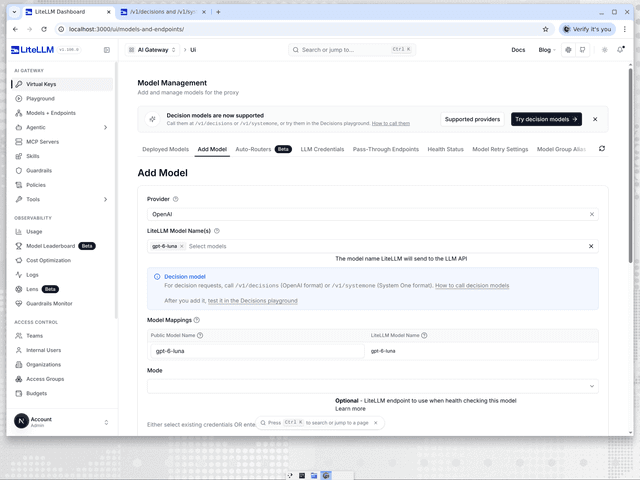
Go to Models + Endpoints, open the Add Model tab and pick the provider, for example OpenAI. Pick the decision model under LiteLLM Model Name(s), for example gpt-6-luna, and a Decision model note confirms the pick and links to the Decisions playground. Enter the provider credentials as you would for any other model, then click Add Model. The model then answers on /v1/decisions and /v1/systemone under its public model name. Providers that need an endpoint URL, such as Databricks and Microsoft Foundry, take it in the API Base field, matching the api_base in the proxy setup. The optional Mode dropdown has a Decisions - /v1/decisions entry from v1.107.0-rc.1, named Evaluation - /v1/decisions in v1.106.0, for health checking the model over /v1/decisions.
Decisions playground
The Playground Decisions tab (Beta) sends requests to both routes. Open it at LITELLM_PROXY_BASE_URL/ui/?page=llm-playground&tab=system-one, or go to Playground and pick Decisions. The Endpoint selector picks /v1/decisions (OpenAI Decisions format) or /v1/systemone (System One format). The Model selector lists the decision models in your model_list, such as jev from the proxy setup, and a proxy with no decision models shows an Add a decision model link instead. An OpenAI decision model such as luna is listed once its model_info sets mode: evaluation.
model_list:
  - model_name: luna
    litellm_params:
      model: openai/gpt-6-luna
      api_key: os.environ/OPENAI_API_KEY
    model_info:
      mode: evaluation
API key picks the key. Current UI Session uses your dashboard login, and Virtual Key attributes the call to a key you paste. Load example fills in one of four requests: Triage a bug report, Route a support ticket, Moderate a forum comment or Score a sales lead. The form starts empty, and the eraser button clears it. Type the text the model should read into Input, then give each question a Name, an Answer type and Instructions. The answer types are Choice, Yes / no and Score on /v1/systemone, and Predicate, Choice and Score on /v1/decisions, which also takes an optional Safety identifier. Add question adds a card, and the trash buttons remove questions, options and levels. The cURL tab shows the same request as a curl command that follows your edits, and Copy cURL copies it once the form has no issues. The form only takes text, so send image, audio and video input with curl or the SDK.
Problems the form can catch, such as an empty Input, are listed above Send, which stays disabled until they are fixed. Others come back from the provider when you send, such as a /v1/systemone yes / no question with no instructions and no Yes means or No means. Once the call returns, each question shows its answer and probabilities, and the Response header shows the latency, the model name from the response and the token usage. Raw response opens the JSON body. An error, such as a 401 for a bad key, shows Decisions request failed and the error message instead of the answers.
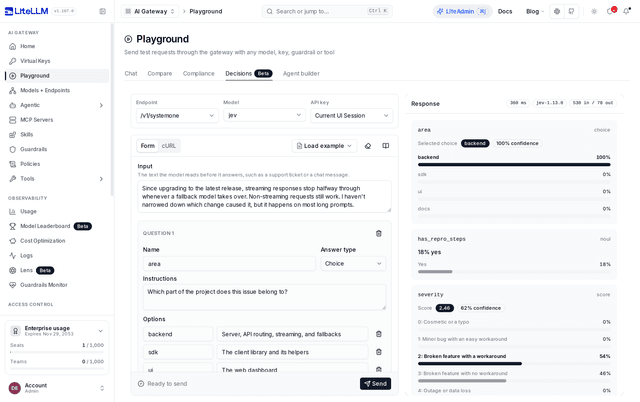
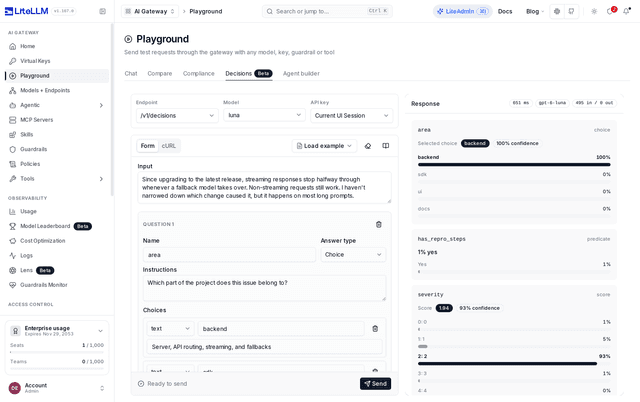
The tab is in v1.106.0 and later, and not in v1.104.2 or v1.105.0. v1.106.0 starts with the first example filled in, picks others from a dropdown instead of Load example, and labels the eraser Clear.
Use a decision model as a guardrail
The Decision Model guardrail asks any supported decision model yes/no questions you write about each request or response, and blocks or logs the call when a probability reaches its threshold
Decision routes vs pass-through routes
The OpenRouter pass-through at /openrouter/alpha/decisions forwards raw requests to OpenRouter only. /v1/decisions and /v1/systemone use the models in your model_list, so you can switch providers, load balance and set per-deployment keys without changing the request body
Migrate from TypeSafe pass-through
The TypeSafe pass through is stripped in v1.113.0. Once you've upgraded to that version or later /typesafe/... will return a 404. Jev is available through /v1/systemone and /v1/decisions. You need to have a model deployment configured as the unified routes use model_list rather than just forwarding any old path through to TypeSafe.
Set TYPESAFE_API_KEY on the proxy and add this deployment to its config. Clients authenticate with a LiteLLM key in LITELLM_API_KEY (not the TypeSafe key).
model_list:
  - model_name: jev
    litellm_params:
      model: typesafe/jev-1.14.0
      api_key: os.environ/TYPESAFE_API_KEY
For an existing System One request, change the path from /typesafe/v1/systemone to /v1/systemone and set model to the deployment name, jev. Leave state and the questions map as they are. For images, send the JSON rather than the multipart upload. PNG and JPEG images are base64 assets on /v1/systemone or input_image parts on /v1/decisions. Both of these require TypeSafe-Danger-Zone-Images: true.
Replace <BASE64_PNG> with the base64 bytes of a PNG (no data URL prefix). The asset name must be present in state.
curl -X POST 'http://localhost:4000/v1/systemone' \
  -H "Authorization: Bearer $LITELLM_API_KEY" \
  -H 'Content-Type: application/json' \
  -H 'TypeSafe-Danger-Zone-Images: true' \
  -d '{
    "model": "jev",
    "state": {"photo": "photo-red"},
    "assets": {
      "photo-red": {"type": "image", "format": "png", "data_base64": "<BASE64_PNG>"}
    },
    "questions": {
      "red": {"type": "noul", "instructions": "Is the image mostly red?"}
    }
  }'
For OpenAI shaped requests use /v1/decisions with input and a questions array. In this case the PNG bytes require the data:image/png;base64, prefix. For JPEG use format: "jpeg" in assets or the data:image/jpeg;base64, prefix in an image URL.
curl -X POST 'http://localhost:4000/v1/decisions' \
  -H "Authorization: Bearer $LITELLM_API_KEY" \
  -H 'Content-Type: application/json' \
  -H 'TypeSafe-Danger-Zone-Images: true' \
  -d '{
    "model": "jev",
    "input": [{
      "type": "message",
      "role": "user",
      "content": [
        {"type": "input_text", "text": "Inspect this photo."},
        {"type": "input_image", "image_url": "data:image/png;base64,<BASE64_PNG>"}
      ]
    }],
    "questions": [
      {"name": "red", "type": "predicate", "instructions": "Is the image mostly red?"}
    ]
  }'
These request shapes were tested via a 512x512 PNG through a live proxy and TypeSafe Jev 1.14.0. Both of the unified routes returned 200 on removal, the old pass-through route returned 404. See TypeSafe images, box questions and long context for other image questions and opt-in headers. EU Jev, Laya, Bespoke and the OpenRouter pass-through are separate integrations and are not affected by this change.