Audit Logs
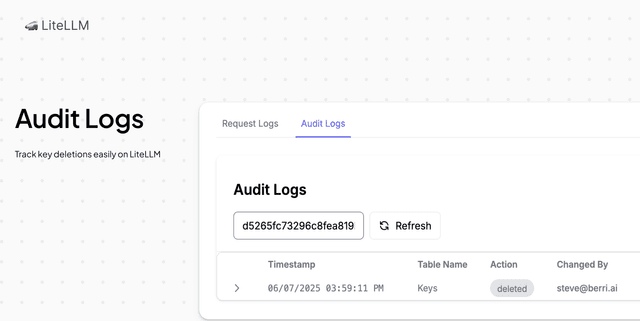
As a Proxy Admin, you can check if and when a entity (key, team, user, model, guardrail) was created, updated, deleted, or regenerated, along with who performed the action. This is useful for auditing and compliance.
LiteLLM tracks changes to the following entities and actions:
- Entities: Keys, Teams, Users, Models, Guardrails
- Actions: Create, Update, Delete, Regenerate
This feature requires a LiteLLM Enterprise license. Start a free 30-day trial or book a demo. See what Enterprise includes.
Usage
1. Switch on audit Logs
With an enterprise license, audit logs are on by default, so there is nothing to configure. If you want to be explicit, add store_audit_logs to your litellm config.yaml and then start the proxy. Without an enterprise license the proxy writes no audit logs, whatever this setting says
litellm_settings:
  store_audit_logs: true
To turn audit logs off on an enterprise license, set it explicitly to false, which takes precedence over the default. LITELLM_STORE_AUDIT_LOGS works the same way as the config setting and is read when the config leaves store_audit_logs unset
litellm_settings:
  store_audit_logs: false
2. Make a change to an entity
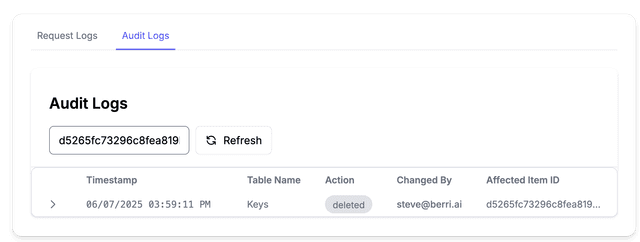
In this example, we will delete a key.
curl -X POST 'http://0.0.0.0:4000/key/delete' \
    -H "Authorization: Bearer $LITELLM_API_KEY" \
    -H 'Content-Type: application/json' \
    -d '{
        "key": "d5265fc73296c8fea819b4525590c99beab8c707e465afdf60dab57e1fa145e4"
    }'
3. View the audit log on LiteLLM UI
On the LiteLLM UI, navigate to Logs -> Audit Logs. You should see the audit log for the key deletion.
When an Audit Log Write Fails Since v1.113.0
A change to a key/team/user/model or other audited object will still succeed even if the database fails to save its audit log. The proxy will log a warning and then retry the write in the background for up to 30 seconds. If it still can't save the entry then that is logged as an error with the name of the object and is counted on litellm_callback_logging_failures_metric with callback_name="audit_log_database" so you can alert on lost audit entries:
groups:
  - name: litellm-audit
    rules:
      - alert: AuditLogEntriesLost
        expr: increase(litellm_callback_logging_failures_metric_total{callback_name="audit_log_database"}[5m]) > 0
If the DB is down past the retry window then the rule will fire whilst any entry was lost in the last 5 minutes and the proxy logs will show Failed Creating audit log for <action> <table> <object id> for each of them.
Export Audit Logs to External Storage
You can export audit logs to an external storage backend (e.g. S3) in addition to storing them in the database. Logs are batched and uploaded asynchronously, so they do not block your proxy requests.
S3 Example
Add audit_log_callbacks and s3_callback_params to your litellm_settings:
litellm_settings:
  store_audit_logs: true
  audit_log_callbacks: ["s3_v2"]
  s3_callback_params:
    s3_bucket_name: my-audit-logs-bucket     # AWS Bucket Name
    s3_region_name: us-west-2                # AWS Region
    s3_aws_access_key_id: os.environ/AWS_ACCESS_KEY_ID
    s3_aws_secret_access_key: os.environ/AWS_SECRET_ACCESS_KEY
    s3_path: litellm-audit                   # [OPTIONAL] prefix path in the bucket
Audit logs are written as JSON files to:
s3://<bucket>/audit_logs/<YYYY-MM-DD>/<HH-MM-SS>_<audit-log-id>.json
# or, when s3_path is set:
s3://<bucket>/<s3_path>/audit_logs/<YYYY-MM-DD>/<HH-MM-SS>_<audit-log-id>.json
audit_log_callbacks only fires while audit logging is enabled on an enterprise license, which is the default unless store_audit_logs is set to false, or it is unset and LITELLM_STORE_AUDIT_LOGS is false.
Send Audit Logs to a Separate S3 Bucket
If you also send normal request/response logs to S3 via callbacks: ["s3_v2"], by default both streams share s3_callback_params and land in the same bucket. To send audit logs to a different bucket (e.g. a compliance-only bucket with stricter access controls or longer retention), add an s3_audit_callback_params block. It accepts the same fields as s3_callback_params and only applies to audit logs.
litellm_settings:
  store_audit_logs: true
  callbacks: ["s3_v2"]                       # normal request logs
  audit_log_callbacks: ["s3_v2"]             # audit logs

  s3_callback_params:                        # used for normal logs
    s3_bucket_name: my-llm-logs-bucket
    s3_region_name: us-west-2
    s3_aws_access_key_id: os.environ/AWS_ACCESS_KEY_ID
    s3_aws_secret_access_key: os.environ/AWS_SECRET_ACCESS_KEY
    s3_path: litellm-logs

  s3_audit_callback_params:                  # used for audit logs only
    s3_bucket_name: my-audit-logs-bucket
    s3_region_name: us-east-1                # different region OK
    s3_aws_access_key_id: os.environ/AWS_AUDIT_ACCESS_KEY_ID  # different creds OK
    s3_aws_secret_access_key: os.environ/AWS_AUDIT_SECRET_ACCESS_KEY
    s3_path: litellm-audit
Advanced
Attribute Management changes to Users
Call management endpoints on behalf of a user, and have the audit log attribute the change to them instead of to the calling key's user_id. (Useful when connecting proxy to your development platform).
Before v1.84.0 the LiteLLM-Changed-By header was honored unconditionally, which let any caller rewrite audit attribution. Since v1.84.0 the proxy ignores the header unless the calling key, or its team, has allow_litellm_changed_by_header: true in its metadata; without the opt in, changed_by falls back to the calling key's user_id. The master key cannot opt in because it has no stored metadata, so send the header with an admin virtual key
1. Allow your admin key to set the header
Set allow_litellm_changed_by_header: true in the metadata of the admin virtual key that will send the header. Setting it on the key's team metadata instead opts in every key on that team
curl -X POST 'http://0.0.0.0:4000/key/update' \
    -H "Authorization: Bearer $LITELLM_API_KEY" \
    -H 'Content-Type: application/json' \
    -d '{
        "key": "sk-my-admin-key",
        "metadata": {"allow_litellm_changed_by_header": true}
    }'
2. Set LiteLLM-Changed-By in request headers
Set the 'user_id' in request headers, when calling a management endpoint. View Full List.
- Update Team budget with the opted-in admin key.
- Attribute change to 'krrish@berri.ai'.
Key change: Passing -H 'LiteLLM-Changed-By: krrish@berri.ai'
curl -X POST 'http://0.0.0.0:4000/team/update' \
    -H 'Authorization: Bearer sk-my-admin-key' \
    -H 'LiteLLM-Changed-By: krrish@berri.ai' \
    -H 'Content-Type: application/json' \
    -d '{
        "team_id" : "8bf18b11-7f52-4717-8e1f-7c65f9d01e52",
        "max_budget": 2000
    }'
3. Emitted Audit Log
{
   "id": "bd136c28-edd0-4cb6-b963-f35464cf6f5a",
   "updated_at": "2024-06-08 23:41:14.793",
   "changed_by": "krrish@berri.ai", # CHANGED BY
   "changed_by_api_key": "example-api-key-123",
   "action": "updated",
   "table_name": "LiteLLM_TeamTable",
   "object_id": "8bf18b11-7f52-4717-8e1f-7c65f9d01e52",
   "before_value": {
     "spend": 0,
     "max_budget": 0,
   },
   "updated_values": {
     "team_id": "8bf18b11-7f52-4717-8e1f-7c65f9d01e52",
     "max_budget": 2000 # CHANGED TO
   },
 }
API SPEC of Audit Log
id
- Type:
String - Description: This is the unique identifier for each audit log entry. It is automatically generated as a UUID (Universally Unique Identifier) by default.
updated_at
- Type:
DateTime - Description: This field stores the timestamp of when the audit log entry was created or updated. It is automatically set to the current date and time by default.
changed_by
- Type:
String - Description: The
user_idthat performed the audited action. If theLiteLLM-Changed-Byheader is passed and the calling key or its team hasallow_litellm_changed_by_header: truein its metadata, thenchanged_by=<value passed for LiteLLM-Changed-By header>
changed_by_api_key
- Type:
String - Description: This field stores the hashed API key that was used to perform the audited action. If left blank, it defaults to an empty string.
action
- Type:
String - Description: The type of action that was performed. One of "create", "update", or "delete".
table_name
- Type:
String - Description: This field stores the name of the table that was affected by the audited action. It can be one of the following values:
LiteLLM_TeamTable,LiteLLM_UserTable,LiteLLM_VerificationToken,LiteLLM_GuardrailsTable
object_id
- Type:
String - Description: This field stores the ID of the object that was affected by the audited action. It can be the key ID, team ID, user ID
before_value
- Type:
Json? - Description: This field stores the value of the row before the audited action was performed. It is optional and can be null.
updated_values
- Type:
Json? - Description: This field stores the values of the row that were updated after the audited action was performed